


TruStage is Temporarily Unavailable. TruStage has reported that they are currently experiencing system outages. Members may experience inconveniences while attempting to submit claims for GAP Insurance, Auto and Home, or Payment Protection to TruStage. For more information, please visit TruStage’s website.
 Utilities Employees Credit Union
UECU Statement changes
UECU’s printed statements and E-Statements have been updated with a fresh new look and layout. You may notice some changes, including a more mobile-friendly E-Statement.
Overview of your Statement and E-Statement Changes
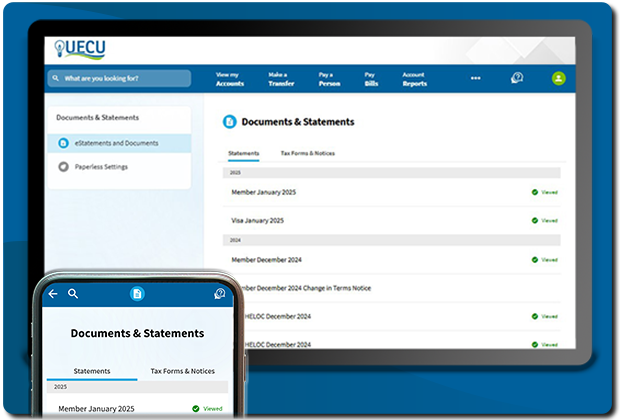
View your new streamlined mobile-friendly E-Statement
This mobile-friendly display is easy to view on any screen size, providing quick access to a summary of your accounts and transactions.
Log in to Mobile and Online Banking and choose Documents and Statements from the menu to see a list of your E-Statements. Select an E-Statement.

In Online Banking, your streamlined E-Statement will automatically appear. (In Mobile Banking, select View to see your streamlined E-Statement.)
To view and download your complete printed statement file — including important statement messages — select the PDF icon.
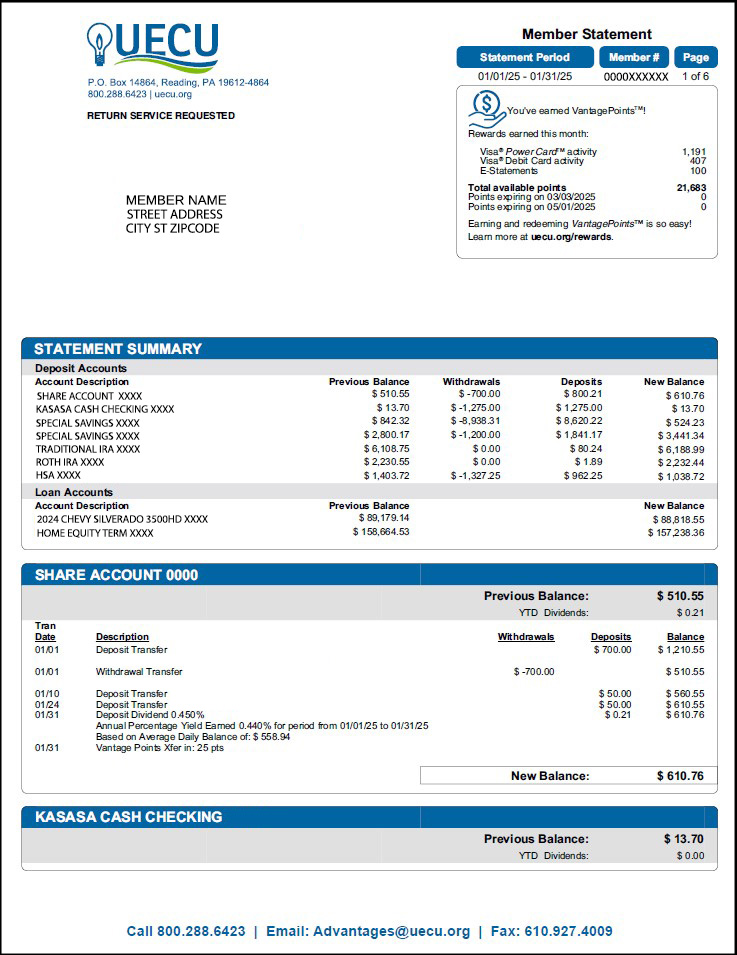
New UECU printed statement sample
Same Important Information, New Member, VISA® & Flex HELOC Statement Designs
Member Statement
Details about your accounts and VantagePointsTM have not changed. The design just got an upgrade.
Individual accounts are outlined, in addition to having a blue title line.
Account summary information now appears in a shaded gray box at the top of each account under the blue title line.
Depending on the type of account, additional important information is found below the list of transactions.
VISA & Flex HELOC Statements
Your Payment Slip now appears at the top of the first page and it includes your mailing address. The payment address is printed on the back of the slip. If you receive a paper statement, it is also printed on the return envelope. Of course, you can always make a payment quickly and easily with a simple transfer in Mobile & Online Banking!
If you have arranged to make your monthly payment with AutoPay by completing and returning an AutoPay form to UECU, you will see your payment choice reflected in the “Payment Enclosed” box as one of these three options: “Paid by Autopay-minimum”, “-full”, or “-fixed.” If you have set up a recurring scheduled transfer in Mobile & Online Banking directly, you will see that information when you log in to your account, but it will not show on the statement. Please log into your account to confirm your Mobile & Online Banking AutoPay status on your account dashboard or in your Scheduled Transfers list under Transfers.
Member Statement: Previous Balance & New Balance Locations
“Beginning Balance” is now “Previous Balance” and is included with the account summary information at the top of each account in the gray shaded box.
“Ending Balance” is now “New Balance” and is found after your list of transactions.
These items no longer appear in the list of transactions. For this reason, if no transactions occured during a statement period, “No Activity This Period” will appear in the transaction section.
Streamlined E-Statement is Mobile-Friendly
In addition to viewing and downloading your complete printed statement file in Mobile and Online Banking, you are now presented with a streamlined mobile-friendly listing of your accounts. This new view provides quick access to a summary of your accounts and transactions.
E-Statement History
Two years of account E-Statements are available for view in Mobile and Online Banking. You can still view and download complete printed statement files. The streamlined mobile-friendly view is available starting with February 2025 Member Statements.
E-Statement Tax Forms
Three years of tax forms are available for view in Mobile and Online Banking. They have been reorganized by tax year. (i.e. 2023 tax forms printed in the spring of 2024 are categorized with all 2023 tax forms.)
Go Paperless & Earn VantagePointsTM
Make your statement delivery safer than ever, and earn VantagePointsTM at the same time. When you go paperless and view your statements in Mobile and Online Banking, you take confidential account and personal information out of circulation. You can always print your statements if you need them. UECU members, click here to log in and choose paperless delivery of your private account and personal information, and earn bonus VantagePointsTM.